Roundup
5 Offline PDF Compressors (2026)
Application forms, contracts, quotes, internal approval documents. Many of the PDFs people want to shrink are documents they don't want to let out. We narrowed the field to 5 tools that compress without putting anything online, looking at OS, price, and how well each one suits Japanese PDFs.
 Daichi
November 3, 2026
~8 min read
For professionals handling confidential PDFs
Selection criteria for offline PDF compressors
This roundup covers only software that processes PDFs on your own computer or on a server you manage yourself. If you hand files to another company's server, that's an online service. We looked at these 5 points.
- Local processing: the PDF doesn't leave your organization
- Text preserved: for documents you need to search or copy from, converting pages to images won't work
- Holds up on Japanese PDFs: PDFs exported from Word or Excel are the tricky ones
- Batch processing and automation: if you do the same job every month, having a CLI changes how much work it takes
- Setup and upkeep costs: one-time purchase, subscription, or a server to run
iLovePDF and SmallPDF can target sizes such as 200KB, but they process PDFs by uploading them, so we left them out of this comparison.
Check the compression method as well. Recompressing images can keep the text, but redrawing pages as images loses it.
Comparison table for the 5 tools
Based on facts as of November 2026.
| Product | Supported OS | Price | Processing | Method and features | Best for |
|---|---|---|---|---|---|
| Karui | Windows 10+ / macOS 12.0+ | Free tier 20 files/day / Pro $29 one-time | 100% local | Three levels (Light / Standard / Strong) plus a Quality slider. Shrinks files by recompressing images and re-subsetting fonts, and keeps text as text | Non-engineers. People who want to process confidential documents quickly in a GUI |
| Ghostscript | Windows / macOS / Linux (CLI) | Free | Local | Reduces embedded images with presets such as -dPDFSETTINGS=/ebook |
Developers. People who want to build it into scripts |
| PDF24 Creator | Windows | Free | Offline | Offline version that bundles PDF24's tools and a PDF printer | Windows users who want one free GUI tool on hand |
| Stirling PDF | Self-hosted (used through a browser) | Free (open source) | On your own server | Runs a set of tools, including PDF compression, in your own environment. You provide and operate the server | People with an in-house server who want to share it with a team |
| Adobe Acrobat Pro | Windows / macOS | Subscription | Local (license activation required) | High-quality PDF compression, in a product that also covers editing and signing | People who already subscribe and also edit PDFs |
Review of each tool
Karui: first choice for working entirely in a GUI
Karui is a desktop app built with Tauri v2 and Rust. Drop a PDF, choose the compression strength and quality, and it compresses. Processing stays on your computer and works without an internet connection.
Compression strength has three levels: Light, Standard, and Strong. Standard recompresses fonts and images and keeps the document structure. Strong also lowers image resolution and removes metadata and structure tags. Text stays as text at every level, and you can fine-tune quality with the slider.
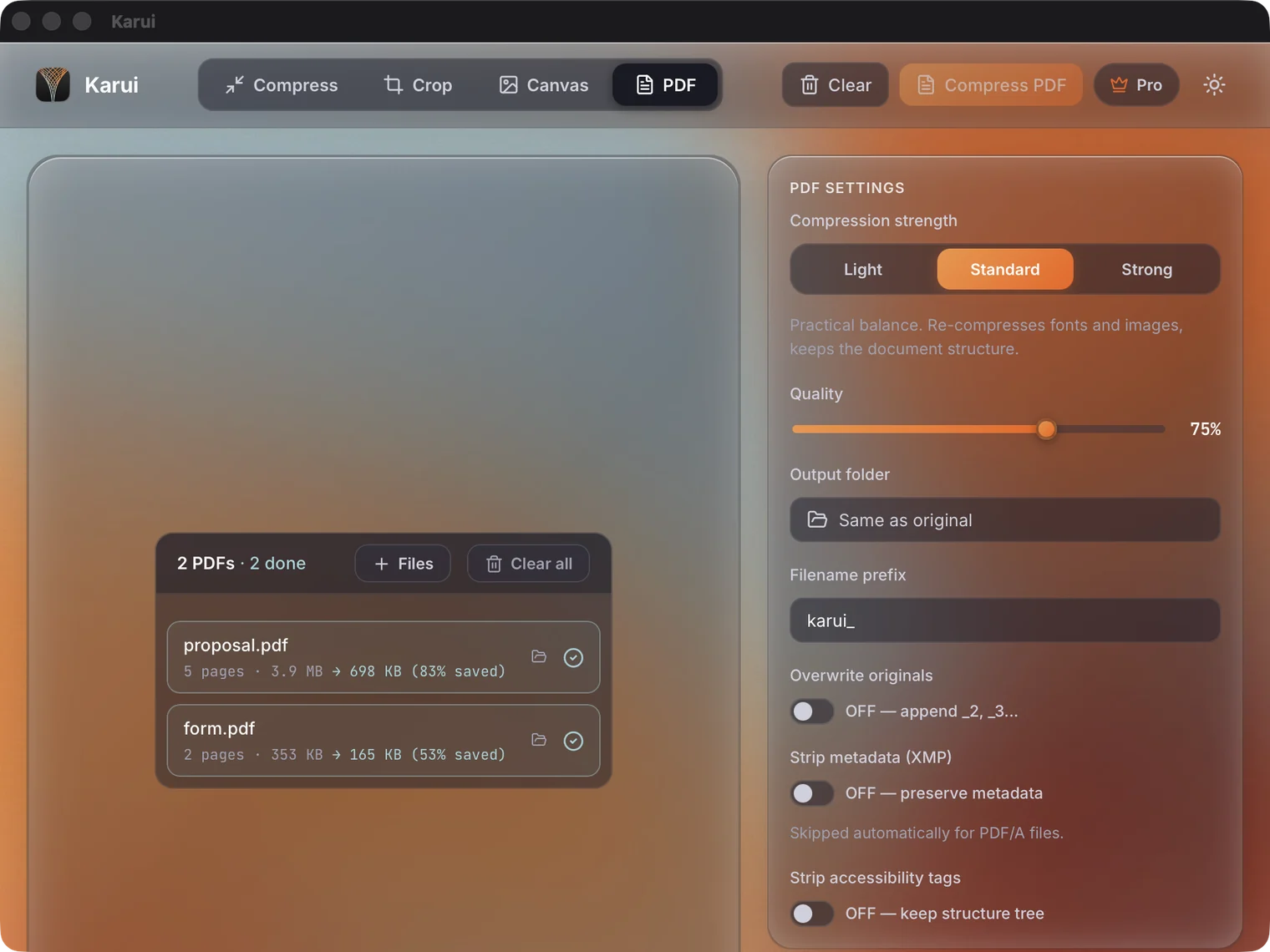
In our own measurements, all 8 kinds of PDF came out smaller than Ghostscript's /ebook at the Strong setting. The Japanese small-business doc was 73.9% vs 48.0%, and the English sample was 94.7% vs 69.1% (reduction rate). At Standard, some files don't reach /ebook. There is no guarantee you will get the same numbers.
PDF reduction rate (higher means a smaller file)
It suits professionals who can't send contracts or application forms outside. It works the same way on Windows and macOS, and it also has batch processing and a CLI. It doesn't suit people who want automatic adjustment to a target size. Karui doesn't have that feature, so you have to check the size while changing the quality.
The free tier is 20 files a day (shared across GUI, CLI, and MCP). You can try Pro features for 7 days. Ongoing use is a $29 one-time purchase with a perpetual license and 1 year of updates. The Windows version has no code signing, so a SmartScreen warning may appear.
To shrink confidential PDFs without sending them outside, you can try it free for up to 20 files a day (no card required)
Try Karui FreeGhostscript: the standard free CLI, but test Japanese PDFs first
Ghostscript is a free command-line PDF processing tool. For PDF compression, you set -dPDFSETTINGS to a value such as /ebook to lower the resolution and quality of embedded images.
gs -sDEVICE=pdfwrite -dPDFSETTINGS=/ebook -o out.pdf in.pdfIts strength is that it's free and can be built into scripts. For developers processing large volumes, it's a realistic choice.
Its weakness is that documents with embedded fonts or Japanese text can break. Because /ebook reduces images uniformly, fine text and ruled lines can become hard to read. There's no GUI, so the barrier is high for non-engineers. It suits developers who can rely on a CLI and automation. It doesn't suit non-engineers who need to guarantee how Japanese PDFs look.
PDF24 Creator: free offline toolkit for Windows
PDF24 Creator is free software for Windows. It packages PDF24's tools and a PDF printer in a form you can use offline.
Its strength is that you can start using it with no additional contract. Merge, split, convert, and compress are all available from one app, and it includes a PDF printer.
Its weakness is that it's Windows-only. It doesn't run on macOS or Linux. With so many features, the screen also carries a lot of information, which can feel heavy if you just want to compress as quickly as possible. It suits people who want to settle on one free PDF tool for Windows. It doesn't suit Mac users or people who want to automate with a CLI.
Stirling PDF: self-hosted open source
Stirling PDF is a self-hosted, open source PDF tool. You put it on your own server and compress or convert PDFs from a browser. Files are processed on a server you manage yourself.
Its strengths are that it's open source and free, and that a team can use the same environment.
Its weakness is that you have to provide and operate the server yourself. It takes more upkeep than a desktop app, and it's aimed at people who can set up a server in-house. It suits IT administrators and people who want to share PDF tools across a team. It doesn't suit individuals who want everything to stay on one computer.
Adobe Acrobat Pro: feature-rich, but more than you need for compression alone
Adobe Acrobat Pro is a subscription product that also covers PDF editing, signing, and protection. Its PDF compression quality is high, and it's widely used as a business standard.
Its strength is that work beyond compression can be done in the same app. If you also need to delete pages, merge, or sign, one product covers it.
Its weakness is price. It's expensive if all you want is smaller PDFs, and the subscription authentication also requires a connection. In a fully offline environment, license verification becomes a problem. It suits people who already subscribe to Acrobat and edit PDFs regularly. It doesn't suit people who don't want another subscription just for compression.
If you don't want to install software: what in-browser processing can do
People often say they don't want to install anything. If processing happens entirely in the browser, files don't have to be sent outside. Karui's browser version runs on WASM, and neither images nor PDFs are uploaded.
The browser version compresses PDFs too, up to 50MB per file. In our test a 3.9MB PDF came down to 1.4MB. The same PDF reached 698KB with Standard in the desktop app, so the desktop app is the better choice when size matters most.
If you need to hit a specific target size, there are upload-based online services. iLovePDF and SmallPDF have features that let you specify sizes such as 200KB. But your PDF is sent to the service's servers. Don't use them for confidential documents, personal information, or unpublished materials.
Use the desktop app when size matters most, the browser version when you can't install software, and an upload-based service when the PDF isn't confidential and you need a specific target size.
Which one to choose
- Compressing confidential PDFs on Windows/macOS: Karui. Start with Standard, and if that isn't enough, move up to Strong and check the size
- You want a free GUI tool on Windows: PDF24 Creator. You also get a PDF printer in the same package
- You want to batch process with a CLI: Ghostscript. Verify Japanese PDFs on one file first
- You want to share on a team server: Stirling PDF. Factor in the operational work when deciding
- You already subscribe to Acrobat: Acrobat Pro. No need to add another piece of software
If compression is the only goal, you don't need a long feature list. Check four things: the PDF doesn't go outside, the text stays, Japanese doesn't break, and the file reaches your target size.
Shrink that PDF without putting it online
No credit card, free for 20 files a day. If you like it, $29 once (perpetual license + 1 year of updates).
Windows 10+ / macOS 12.0+ / 100% local processingFAQ
Is there software that can compress PDFs fully offline?
Yes. Karui, PDF24 Creator, Ghostscript, and self-hosted Stirling PDF can compress PDFs without sending them outside. The desktop version of Acrobat Pro also processes locally, but its subscription authentication requires a connection.
Which offline PDF compressors are free?
Ghostscript, PDF24 Creator, and Stirling PDF are free. Karui is free for up to 20 files a day. Beyond that, or for ongoing use, it's a $29 one-time license.
Can Japanese PDFs break?
Yes. With Ghostscript, text and layout can break on embedded fonts and Japanese documents. With any tool, test one file and check the text, figures and tables, and page count before running the real job.
Are there offline PDF compressors for Mac?
Karui, Ghostscript, and Adobe Acrobat Pro work on macOS. PDF24 Creator is for Windows. Stirling PDF can also be used from a browser on a Mac once it's running on a server.
How is this different from online PDF compression services?
Online services upload your PDF to a server for processing. With offline software the file stays on your computer, which suits confidential documents. iLovePDF and SmallPDF are convenient for specifying a size, but they depend on uploading, so we left them out of this comparison.