How-to Guide
How to Batch-Convert iPhone Photos to WebP (Smaller Files for the Web)
Upload iPhone photos straight to a blog and each one runs several MB. They display, but they load slowly. This guide covers how to take the HEIC photos you have on hand, convert them to WebP, and bring them down to 1600px on the long edge.
 Daichi
September 29, 2026
~5 min read
For people who run blogs, online stores, or landing pages

Where WebP fits
WebP is a format built for images shown in a browser. It suits places where the display size is fixed and you can swap the files.
For a blog, that means thumbnails on article lists and photos within articles. Even for the same article, whether an image is 3MB or 200KB makes a visible difference in how fast the page displays. For an online store, it means product listings and category pages. With dozens of images on one page, the savings per image add up. For a landing page, it means the hero image in the first view. It loads first, so this is where the effect is greatest.
It is a poor fit for print submissions and printing, email attachments, and importing into apps that can't read WebP. Keep JPEG for those. WebP is strictly a format for display in a browser.
JPEG vs. WebP
The big difference is whether you can choose the compression method. JPEG is lossy only. WebP has both lossy and lossless.
| Item | JPEG | WebP (lossy) | WebP (lossless) |
|---|---|---|---|
| Compression | Lossy only | Lossy | Lossless |
| Transparency | No | Yes | Yes |
| Browser support | All | Major browsers | Major browsers |
| Best for | Photos, compatibility | Photos on the web | Logos, graphics |
Use lossy for photos. Like JPEG, it discards high-frequency detail that is hard for the human eye to notice. Lossy WebP tends to be smaller than JPEG, but the difference depends on image content. WebP is not always half the size.
Lossless keeps the original pixels fully intact, like PNG. Use it for logos, icons, and graphics with text. Using lossless on photos actually makes files larger.
Format conversion and resizing
Converting a format only changes the container. The number of pixels stays the same. Going from HEIC to WebP at the same resolution does not change the file size by an order of magnitude.
Resizing is what makes the difference. Images in a blog post never display wider than the article layout. Even featured images need no more than 1600px on the long edge. Even on Retina displays, you don't need more than twice the display width. iPhone photos go well beyond that, so simply dropping to 1600px on the long edge cuts the pixel count to a fraction of the original.
Total size of 6 HEIC photos (WebP, quality 82)
Don't get the order wrong. Lower the quality first and you get block noise and color banding. Reduce the resolution first and keep quality around 82. That is how to keep photos for the web looking clean.
You can check the original resolution with karui info photo.heic. You only need to add a resize when it is far larger than the display size.
Batch-converting HEIC to WebP in Karui
Karui is a macOS / Windows app that takes HEIC / HEIF as input and can export WebP. Processing is 100% local, so your photos don't go up to the cloud.
Here is how to try it in the GUI first. Launch Karui and drop your HEIC files in all at once. Open Advanced settings, select WebP as the output format, set the max edge to 1600px and quality to 82, then press Compress. The results show the original size, the converted size, and the percentage saved, so it's safer to run one photo through first and check.
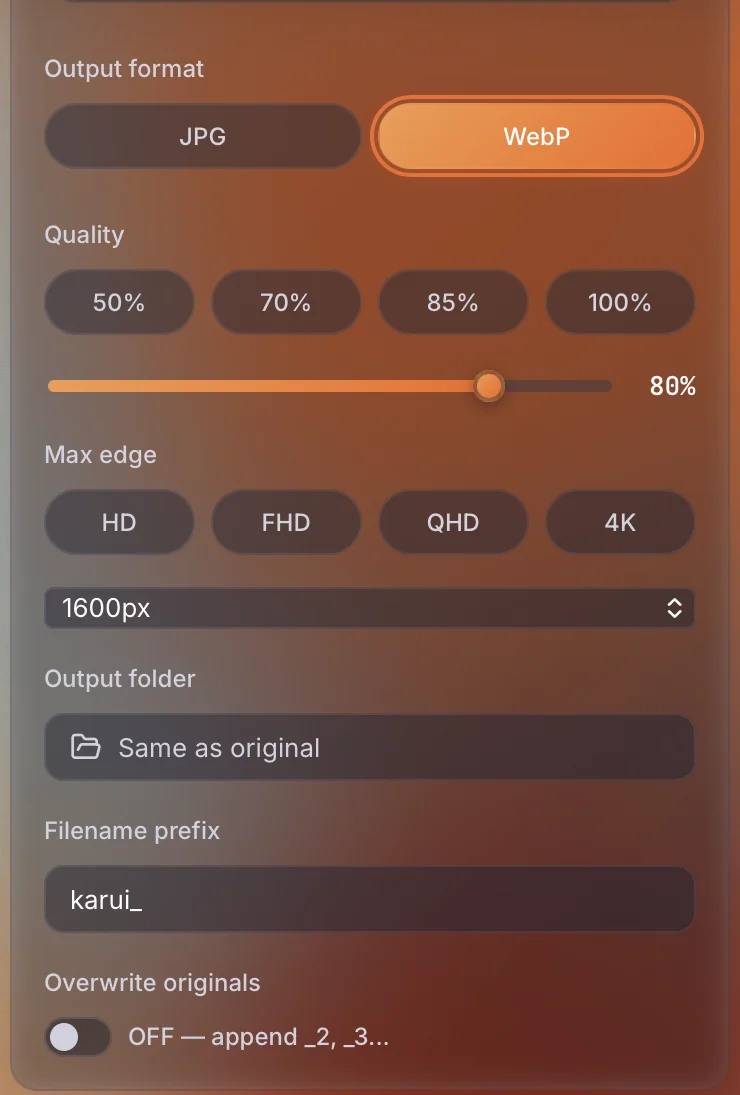
For large batches, the CLI is faster. Install it on macOS and run it in the folder with your photos.
curl -fsSL https://karui.app/install.sh | sh

karui compress *.heic -f webp -q 82 -e 1600 -o out/
karui compress hero.jpg -f webp -q 82 -e 1600karui compress *.heic -f webp -q 82 -e 1600 -o out/
photo-01.heic -> out/photo-01.webp (1.68 MB -> 344.1 KB, 79.9% smaller, 1600x1067)
photo-02.heic -> out/photo-02.webp (683.2 KB -> 169.4 KB, 75.2% smaller, 1600x1067)
photo-03.heic -> out/photo-03.webp (1.58 MB -> 346.5 KB, 78.6% smaller, 1600x1067)
photo-04.heic -> out/photo-04.webp (1.71 MB -> 314.1 KB, 82.1% smaller, 1600x1067)
photo-05.heic -> out/photo-05.webp (2.27 MB -> 571.3 KB, 75.4% smaller, 1067x1600)
photo-06.heic -> out/photo-06.webp (595.4 KB -> 73.5 KB, 87.7% smaller, 1600x1067)
done: 6 compressed, 0 failed
-f is the output format, -q is quality, -e is the long edge, and -o is the output location. The web preset is 1600px / q75, so start by trying --preset web. If the files aren't small enough, lower the quality. If detail falls short, raise it.
One caveat: only the macOS build of the CLI can read HEIC. The Linux / Windows CLI builds cannot read HEIC / AVIF. The desktop app handles HEIC on Windows too, but for batch processing with the CLI, run it on a Mac.
Batch-convert with one command. Try it free for 20 files a day
Try Karui FreeRecommended settings for blogs, online stores, and landing pages
Choose the long edge and quality based on how the image is used. Combine all of these with -f webp.
| Use | Long edge | Quality | Example command |
|---|---|---|---|
| Blog post images | 1600px | 82 | -f webp -q 82 -e 1600 |
| Blog featured image | 1600px | 75 | -f webp -q 75 -e 1600 |
| Online store product listing | 1280px | 75 | -f webp -q 75 -e 1280 |
| Landing page hero | 1920px | 75 | -f webp -q 75 -e 1920 |
Quality 82 is the same value used in Karui's CLI examples for WebP conversion. It suits in-article images where you want to keep photo detail. For thumbnails in lists, 75 is enough, and the files get smaller too. If you are unsure, output one image at 1600px / 82 and check it at 100% in a browser.
Specifying a value larger than the original long edge does not improve quality. Always enter a value at or below the original resolution.
Convert your photos to WebP before they go on the web
No credit card, free for 20 files a day. If you like it, $29 once (perpetual license + 1 year of updates).
Windows 10+ / macOS 12.0+ / 100% local processingThings to watch when converting to WebP
Older Safari and unsupported apps
WebP is supported in major browsers. But older Safari, older browsers still in use inside companies, and some email clients and CMSs may not display it. If you can't predict the environment you are delivering to, serve WebP and JPEG with <picture>, or export JPEG at the same time.
Transparency and edges
WebP can keep transparency. This doesn't matter for photos, but lossy compression blurs the edges of logos and cutouts. Karui's WebP output is lossy, so for graphics that need transparency, it's safer to keep them as PNG and compress losslessly with karui compress logo.png.
Lossless and lossy
The WebP format also has a lossless mode, but Karui's WebP output is lossy. Lossy is enough for photos, and lossless makes files larger. Conversely, using lossy on screenshots or graphics with text creates noise around the text. Choose based on the subject.
FAQ
What is the fastest way to batch-convert iPhone photos to WebP?
Use the Karui CLI on macOS and run karui compress *.heic -f webp -q 82 -e 1600. HEIC reading is enabled in the macOS build. The GUI can also batch-process with the same settings.
Does WebP display in every browser?
Major browsers support WebP. But older Safari, some email clients, and CMSs that are no longer updated may not display it. When you can't predict the environment you are delivering to, also export JPEG or provide a fallback with the picture element.
Does converting to WebP alone make files smaller?
Conversion alone does not change the size by an order of magnitude. Resolution is what matters. iPhone photos are far larger than web display widths, so resizing to 1600px on the long edge before converting to WebP reduces the pixel count and the file size. Lowering quality comes after that.
Can I convert a PNG with transparency to WebP?
WebP can keep transparency. But unlike photos, logos and cutouts show edge degradation clearly. Karui's WebP output is lossy, so it's safer to keep transparent graphics as PNG and compress them losslessly.
How much can I convert for free?
Karui is free for 20 files a day. No credit card is required, and you can also try Pro features for 7 days. For jobs of more than 20 photos or ongoing use, a one-time $29 license makes it unlimited.